Labs
Argo CD Architecture
Argo CDs core components are the API Server, the Repository Server and the Application Controller
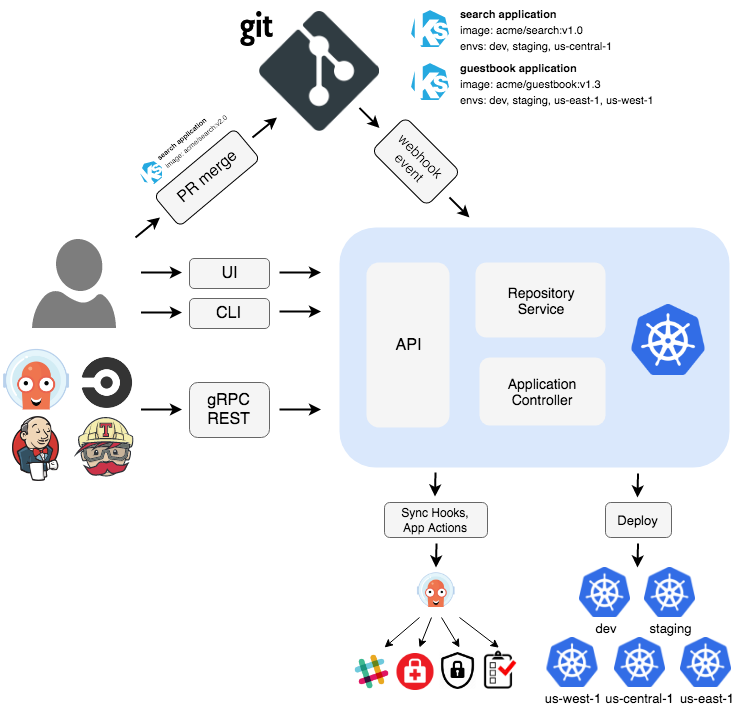
Image and component description source: https://argoproj.github.io/argo-cd/
API Server
The API server is a gRPC/REST server which exposes the API consumed by the Web UI, CLI, and CI/CD systems. It has the following responsibilities:
- application management and status reporting
- invoking of application operations (e.g. sync, rollback, user-defined actions)
- repository and cluster credential management (stored as K8s secrets)
- authentication and auth delegation to external identity providers
- RBAC enforcement
- listener/forwarder for Git webhook events
Repository Server
The repository server is an internal service which maintains a local cache of the Git repository holding the application manifests. It is responsible for generating and returning the Kubernetes manifests when provided the following inputs:
- repository URL
- revision (commit, tag, branch)
- application path
- template specific settings: parameters, ksonnet environments, helm values.yaml
Application Controller
The application controller is a Kubernetes controller which continuously monitors running applications and compares the current, live state against the desired target state (as specified in the repo). It detects OutOfSync application state and optionally takes corrective action. It is responsible for invoking any user-defined hooks for lifecycle events (PreSync, Sync, PostSync)
Argo CD Core Concepts
Those core Concepts exist in Argo CD:
- Clusters: pre configured Kubernetes Clusters (including OpenShift)
- Repositories : pre configured git repositories, including repository credentials (ssh, username-password).
- Applications : A group of Kubernetes resources, represented in a git repository. Usually the Kubernetes resources which will be applied in a Kubernetes namespace. Represented as CRD .
- Projects : A logical grouping of Argo CD applications. Various restrictions can be defined on project level. Useful when multiple Teams work with the same Argo CD instance